Pre-Implementation Checklist: Preparing Your Team for New Stakeholder Management Software

Congratulations! You’ve made it! You and your team are preparing to install the new stakeholder management software that’ll make your job, in fact, your entire working life, that bit, well…simpler.
You’ve chosen your stakeholder relationship management (SRM) platform, all that’s left is…
… making sure everyone knows what they’re doing.
… checking that all your staff and their business units understand why a change in stakeholder management is happening.
… outlining the benefits of a new SRM platform (and getting everyone excited about it).
… ensuring that all the right data is collected for migration.
…informing the technical team that a switch is happening.
…planning, training and support.
…and, and, and.
Suddenly, ‘all that’s left’ sounds like a mountain of work. But in our experience, with some planning and forethought, it’s a very manageable mountain.
Preparing For Stakeholder Management Software
Joana Zaper, a member of the Simply Stakeholders’ customer success team, has helped dozens of businesses, organizations, and government departments implement or transition to our SRM platform.
Her emphatic answer to the question, ‘What’s the most important part of preparing a team for stakeholder management software?’ is this:
“It’s buy-in from the people who will be using it most. The system is only useful if it’s embraced by those tasked to use it. Onboarding and support are crucial pre-implementation steps that every organization should consider.”
Securing genuine, enthusiastic buy-in is crucial to the smooth implementation of your new SRM. Besides that, you need to get a few other digital ducks in a row.
The SRM Software Pre-Implementation Checklist
To help you and your team prepare, our customer success team recommends doing (or at least considering) the items on this checklist to smooth the arrival of your new SRM software.
Save, bookmark, or (old school) print out the pre-implementation checklist that best describes your situation.
Are you…
Using an SRM platform but want to change or upgrade
When You Don’t Already Have an SRM
Giving up a legacy system, such as paper records and spreadsheets, can feel tough. Particularly if that system has been years (or decades) in the making. It can feel like you’re undoing or even losing a lot of hard work and careful thought.
Don’t dismiss this concern; reframe it. The processes your spreadsheets and physical records helped establish are just being upgraded. Part of this reframing is recognizing that they don’t have to be completely scrapped.
SRM platforms are efficient and create a centralized, single source of truth. And when setting up a completely new stakeholder management software system, you have the freedom of starting with a blank canvas.
You want to make sure the blank canvas becomes the creation you envisioned, and is admired by those who will contribute to its evolution.
This checklist will help you do that.
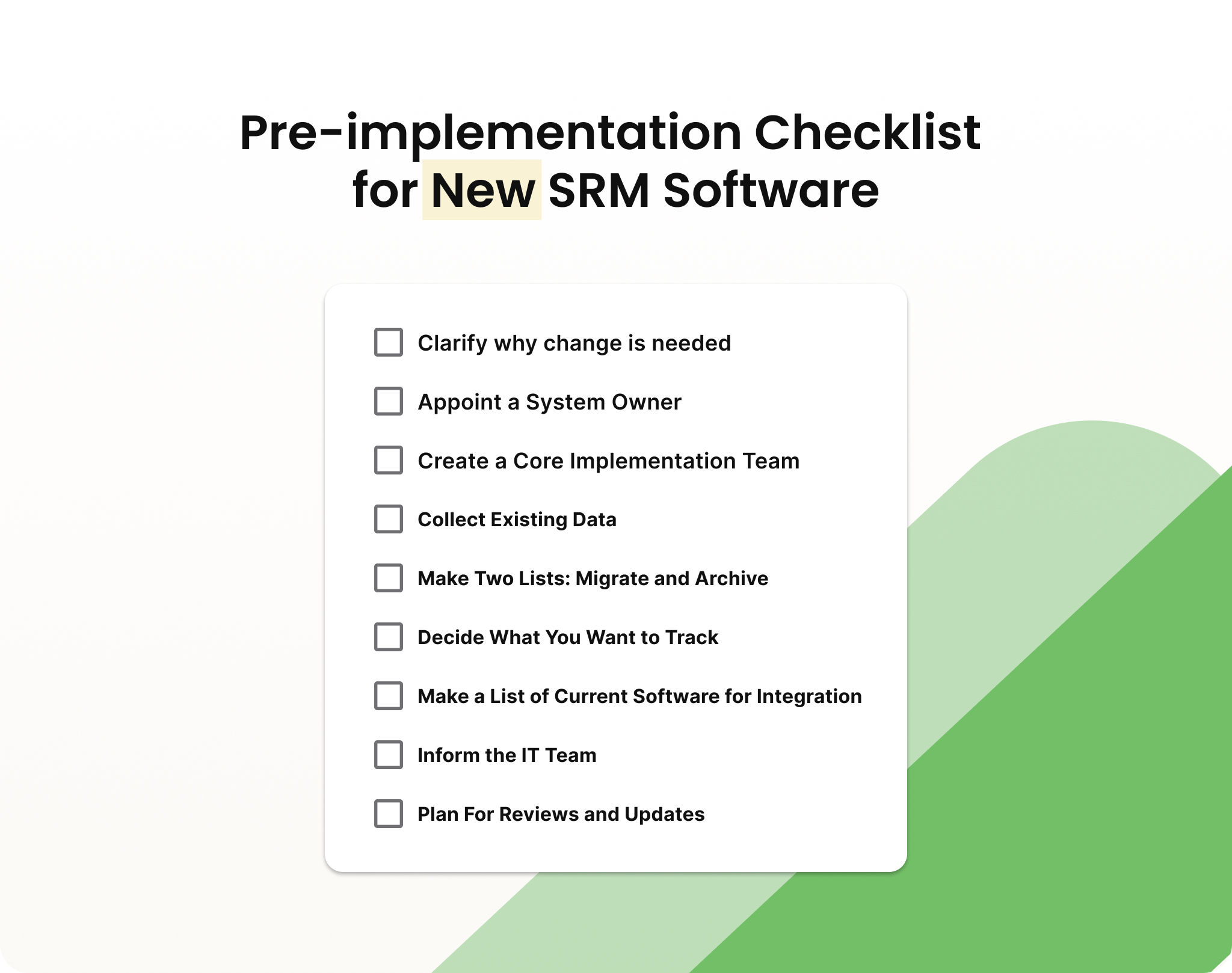
Clarify Why Change Is Needed
Your entire team needs to understand what’s driving the change in stakeholder reporting. This brings clarity to the project, and that’s useful for individuals as well as the wider organization.
Start by explaining why the SRM is useful to the organization. How will it help the organization achieve its goals? What problems will it solve? How will it make their lives easier?
Follow that by specifying why this particular software is the best fit for the individuals using it. For example, will collating data for regulatory reporting save time for the compliance team? Or will mapping complex stakeholder relationships ensure the engagement officer doesn’t accidentally leave someone out of important communications?
Communicate the rationale behind the change, the benefits it will bring and what these will actually look like.
Appoint a System Owner
Sometimes called an ‘internal champion’, this person drives the implementation forward. They’re often the bridge between the organization and the software vendor. They work across the entire project and, ideally, have been involved in the selection of the SRM platform.
Choosing a System Owner
The system owner is usually the principal stakeholder consultant. But it could also be a project manager or chief technology officer within the organization. Someone whose work is regularly hampered by the lack of efficient SRM processes or software makes an ideal system owner. They also need some level of decision-making authority as a team leader.

Create a Core Implementation Team
This team’s main role is to support the system owner. Maximize the team’s credibility and expertise by including representatives from each key team or business unit that will use the software. In a perfect world, members of this team will have been involved with the SRM software selection process. (Or at least have been made aware that change was coming.)
Their responsibilities may include:
- Liaising: Communicating messages between the system owner and individuals in the organization who will be affected by the software change.
- New system learning: Attending training sessions provided by the software vendor or system owner, and then leading wider staff training.
- Testing and feedback: Trialling small-scale changes and working with the system, honing in on areas for improvement before full rollout.
- Organizing and Planning: Helping schedule changeovers directly affecting the team they are part of, ensuring deadlines are met with minimal disruption.
Once the system is in place and people in the wider organization can start using it, the core implementation team becomes the first point of contact for team members who:
- Need help troubleshooting problems
- Want to provide feedback to the system owner or software vendor
- Would like any extra training and support.
Collect Existing Data
SRM software centralizes all stakeholder data and information. If, up to this point, that information is scattered — stored in emails, spreadsheets, mobile devices, in people’s heads — then now is the time to locate and list all that information.
Once you have your source list, it’s time to pull all of the data together, as best you can. So you might create a temporary shared workspace where people can dump files, or ask each person with information relevant to stakeholder management to create a file containing all of their data.
It’s entirely possible that what emerges is a hodgepodge of spreadsheets, Word documents with notes, screenshots of emails, and even hand-drawn diagrams. But try and stay calm. It will all get sorted, reviewed, and properly inputted into the new system. You will have a consistently formatted way of documenting all stakeholder management moving forward.
Always Set a Deadline For Data Collection
To maintain the project’s momentum, set a deadline for data collection. Each person should send all their data to (or share it with) the system owner by the time that deadline arrives.
Make Two Lists: Migrate and Archive
It’s decision time. Does all your current stakeholder data need to be migrated into the new software system, or can some of it be archived separately?
Note and store data for migration into the new stakeholder management software in one file. Any historical data that’s going to be archived should be noted on a separate list.
Decide What You Want to Track
Implementing new stakeholder management software lets you track a myriad of data. And you might not need to track everything or use every function the software offers. At least in the beginning. (Just like when this local government started using Simply Stakeholders.)
Evaluating existing data and creating the migrate and archive lists helps determine what’s important to track moving forward. For example, you’ll likely want to track any stakeholder engagement that relates to the organizational strategic plan, as well as any you’re required to track for reporting — regulatory, permitting, internal, and otherwise.
List these ideal tracking metrics. It’s then up to the system owner to discuss what’s possible with the software vendor, who can either confirm how to track those metrics or suggest ideas on how they’ll make it happen.
| Hot tip: It’s rare for our customer success team to be faced with a client request for a particular process, module, or function that we don’t already provide. But if we are caught short, we can customise a workaround with the help of our technical team.
If a specific idea occurs to you during the pre-implementation phase, we’ll work hard to try and make it happen before full rollout. |
Make a List of Current Software for Integration
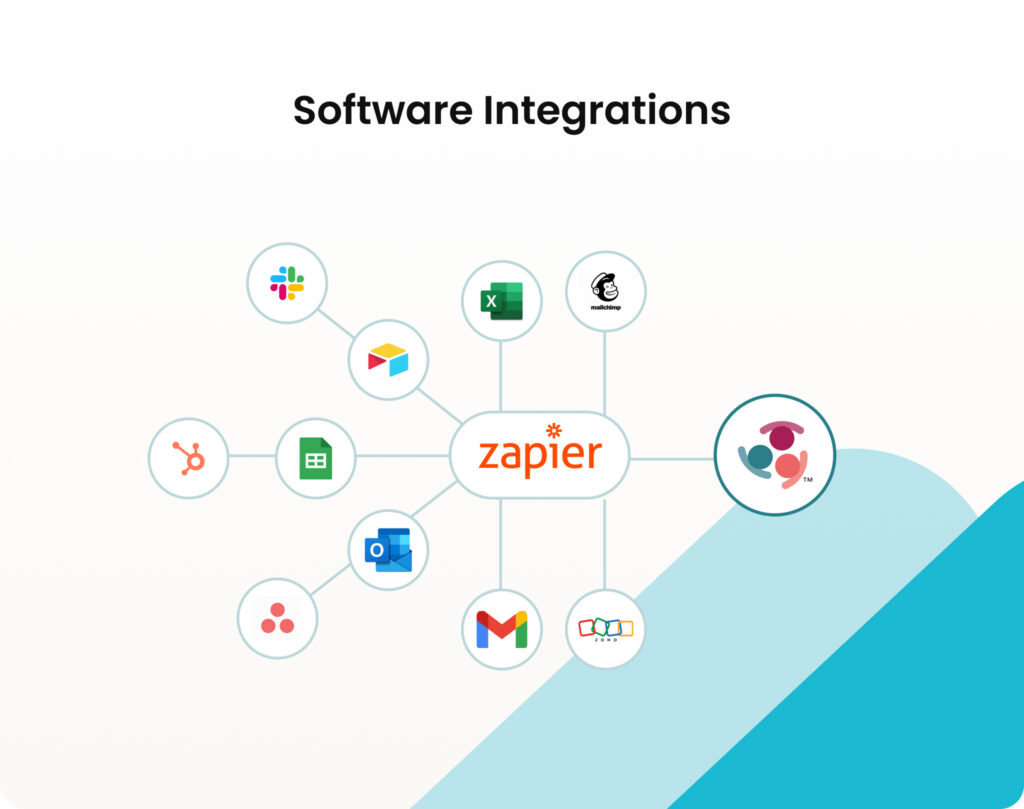
Having new stakeholder management software doesn’t mean abandoning the tools and programs that your organization already relies on. For example, Simply Stakeholders integrates with Zapier, so organizations can continue using Outlook, Gmail, Salesforce, Google Workspace, and more.
The software can also connect to external systems via API, so transferring data to and from other software is simple. You only need to create a list of the current software that needs to be integrated.
Inform the IT Team
In most organizations, the chief technical officer (CTO) or a senior member of the IT team will handle this aspect of the implementation. They’ll set up the software integrations and manage the ongoing administration. (Such as software updates to ensure the integrations and platform remain secure and bug-free.)
Plan For Reviews and Updates
New software strengthens organizations when users can see and feel the benefits. Once the software is up and running, pencil some review dates into the system owner and core implementation team’s calendars to check that everything is going to plan.
Things worth checking could include ensuring all data is migrated by a set deadline or checking the adoption and usage rate of the new software. If a key goal is measuring the number of new stakeholder engagement entries, you’ll want to check how well the new system is supporting that aim.
Before the new stakeholder management software rolls out, if you know:
- What you’d like to review
- When you’d like to review it by
- And updates you might need as your engagement practice evolves
You’re on track to make the most of your new SRM.
When You Already Have an SRM But Want to Change or Upgrade
Many factors can contribute to an established SRM platform becoming unfit for purpose. The internal working of your organization, priorities, budget, size, aims, and goals can all change over time.
Moving to using new stakeholder management software can feel exciting, but challenging. However, you have the benefit of having been here before. If you’ve implemented one system, you know you can implement another one.
To prepare your team for stakeholder management software change, here’s what the Simply Stakeholders’ Customer Success team suggests.
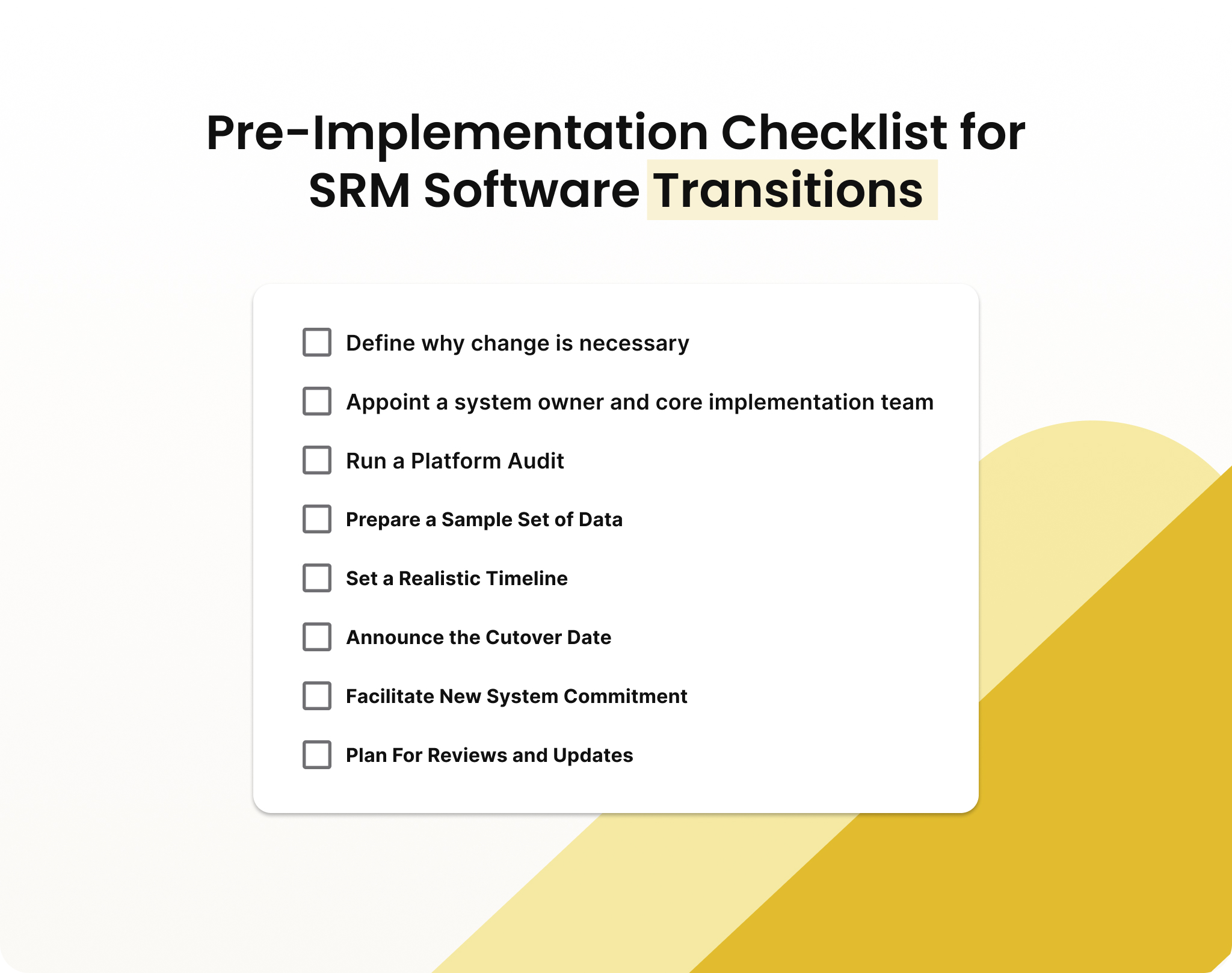
Define Why Change is Necessary
Your system research and selection process probably outlined the prompts for change. Now, at the pre-implementation stage, it’s important for your teams to understand how the new software will perform better than what they already have.
Communicating the rationale for change and the benefits from everyone’s perspective prepares teams for stakeholder management software change. A 2020 report that analyzed data from 1,000 digital transformations completed in the last 20 years found that the most common challenge was the ‘organizational change and “people” part of the transformation.’
Existing systems are likely embedded in your staff’s routines, processes, and culture. Scepticism or reluctance around change is natural. But you can avoid (or at least minimize) it by being clear about why change is necessary and beneficial at both the organizational and individual levels.
Appoint a System Owner and Core Implementation Team
The system owner oversees the transition from one platform to another. They are the point of contact between staff in the organization and the software vendor.
System owners tend to be the stakeholder engagement manager, principal consultant, or project manager.
The core implementation team supports the system owner. This team should include representatives from each key team or business unit that uses the current SRM software.
People in the core implementation team may include:
- Stakeholder engagement team leads
- Project managers within the organization
- A C-Suite representative
- A member of the IT or technical team.
Run a Platform Audit
Changing platforms doesn’t mean scrapping every feature of the current operating system. Parts of it may still prove useful. Identifying what’s valuable will help when setting up the new software.
Run a platform audit to decide which features, capabilities, and data information should be brought across to the new system.
An SRM change is also a good opportunity to evaluate all current stored data. Clients often find there’s a portion of stakeholder data and information that is obsolete, so it’s archived or permanently deleted. Auditing ensures the new stakeholder manager software is uncluttered.

Document the Decisions
Auditing the entire system will likely be a team effort with multiple staff sorting through (potentially) tens of thousands of records. To simplify what’s staying and what’s going, create a list that:
- Includes the name of the file, data, or report
- Names the owner of the document
- Summarizes what the document is.
Mark each record for migration, archiving, or deleting.
Prepare a Sample Set of Data
Data migration is a fairly simple process when using Simply Stakeholders. But it’s always a good idea to upload a sample set of data to check how it moves across and formats.
Having a sample set ready to go lets you test the core features your team will use, so when the cutover date arrives, you’re not held up by trying to decide what to test.
Speaking of cutover dates and timelines…
Set a Realistic Timeline
Transitions almost always take longer compared to implementing SRM software for the first time. To understand how long it will actually take for your organization, the system owner should work with the vendor to create a rollout timeline. Then always add an extra buffer. Despite the best laid plans, gremlins in the system or a ‘forgotten something’ almost always crop up.
Once the timeline is in place, set a hard cutover date. This is when the new system is implemented and data conversion, testing, and staff training get underway.
Announcing the Cutover Date
Do this as early as possible in the project. Knowing the cutover date will help staff working with the current system, so they can have everything in order, ensuring minimal disruption to people’s day-to-day work.
Manage the Crossover
There’s always some crossover between the old system and the new one. People need time to get used to it and form fresh habits. And that’s okay, but don’t run both platforms in parallel longer than necessary. It only creates confusion and delay.
Supporting staff in adopting the new system is a key role for the core implementation team, backed up by the system owner and the software vendor. Training and assistance to become confident, fluent users of the new SRM should be offered to those who need it. And the core implementation team should be the first port of call for troubleshooting any issues that staff encounter.

Plan For Reviews and Updates
Transitioning to a new system is a big decision and a multi-faceted process that needs careful monitoring. The system owner and core implementation team should schedule time to discuss how the rollout is going, check targets, and listen to feedback from the wider organization about how the new system is working for them.
If You’re Preparing For Stakeholder Management Software
Whether you’re looking to use an SRM for the first time or make a transition, properly preparing for stakeholder management software before implementation keeps disruption to a minimum and encourages maximum employee buy-in. And that’s the goal — an SRM is only a powerful tool if it’s embraced by those who need to use it.
Use our pre-implementation lists to help you and your team prepare for new SRM software. Or if you’re looking for support to set up or transition to Simply Stakeholders, our team is ready to help.
Become a Subscriber Don’t miss out on more insights like this! Subscribe to get our regular updates.